LNX-8300-GL: no GVSP data stream with third-party GenICam GenTL consumer (CVB)

Hi everyone,

I’m trying to integrate a Mech-Eye LNX-8300-GL (firmware 2.5.1) with a third-party GenICam GenTL consumer (CVB / STEMMER IMAGING 14.01.007).

The device works perfectly fine when using the official Mech-Eye SDK. However, when using a standard GenTL producer, we receive exactly zero GVSP packets. We are currently utilizing the third-generation GenTL stack (AcquisitionStack::GenTL).

I can attach a minimal main.cpp example that reproduces the problem. The failure happens at WaitFor() — it crashes with a segfault instead of returning a timeout when no data arrives.
main.cpp (5.7 KB)

Current Behavior:

  • Start() succeeds: AcquisitionStatus = true (AcquisitionTriggerWait), and IsGrabbing = true.
  • TriggerSoftware succeeds with no errors.
  • No data received: NumPacketsReceived = 0, StreamDestinationIP = 0, and StreamPort = 0.
  • DeviceRegistersValid = false: The GenTL producer fails to validate the device registers.
  • Crash on timeout: Instead of returning a standard timeout when no data arrives, WaitFor() ends with a SIGSEGV (double free).

Note: We are able to write some GenICam parameters (like ExposureTime) successfully, but we aren’t sure if the root cause is a missing GenICam parameter configuration, a GVCP negotiation problem, or an issue within the GenTL handshake itself.


Questions:

  1. Standard Support: Does the LNX-8300-GL fully support standard GenICam GenTL consumers out of the box, or is it strictly limited to the Mech-Eye SDK and HALCON?
  2. Missing Configuration: Given that AcquisitionStatus = true (AcquisitionTriggerWait) shows the device is ready, what else does it need to start streaming data to the host?

Any guidance, tips, or workarounds would be greatly appreciated!

Hi,

Thanks for the detailed information and the example code — that’s very helpful.

From the current behavior (no GVSP packets received), we’d like to first confirm whether the camera is actually being triggered and projecting light during acquisition.

Could you please help check the following:

  1. Trigger & Projection Check

    • When running your application, does the camera emit the laser / light?
    • If not, it may indicate that the camera is not being triggered correctly.
  2. Validation with Official SDK

    • We recommend running a quick test using the Mech-Eye SDK (or Viewer): C++ (Windows)

      • Connect to the camera
      • Manually trigger an acquisition
      • Confirm whether the camera projects light and successfully captures data
  3. Comparison Result

    • If the camera works correctly with our SDK, but not with your GenTL-based application, the issue is likely related to:

      • Trigger configuration, or
      • Streaming (GVSP) setup in the GenTL pipeline

This step will help us quickly determine whether the issue is on the device side (triggering) or GenTL integration side.

Please let us know the results, and we’ll assist you further based on your findings.

Best regards

Hi,

To answer your questions and provide more context, here are the results of the tests:

  1. Trigger & Projection Check: When I run my application and the software trigger is executed, I can clearly see the laser emitting light. Immediately after that, the application crashes (SIGSEGV at WaitFor()), and the laser turns off. This indicates that the trigger command is successfully reaching the camera and initiating the hardware action.
  2. Validation with Official SDK: Yes, the camera works perfectly fine and captures data without any issues using both the Mech-Eye Viewer and the official Mech-Eye SDK. The problem is isolated exclusively to the GenTL/Common Vision Blox integration.
  3. Additional Diagnostic Data (Node Map Dump): To help investigate the GVSP / GenTL pipeline issue, I have generated a complete dump of the GenICam node trees. This dump captures the exact state of all parameters immediately after calling Start() and before the application attempts to read or wait for the stream.

Hopefully, this dump will help you identify if there is a missing configuration on the GenTL side.
post_start_VinDevice_nodes.txt (175 Bytes)
post_start_TLSystem_nodes.txt (1.7 KB)
post_start_TLInterface_nodes.txt (4.8 KB)
post_start_TLFactory_nodes.txt (462 Bytes)
post_start_TLDevice_nodes.txt (2.4 KB)
post_start_Device_nodes.txt (31.4 KB)

Hi,

Thank you for the detailed feedback and for sharing the node dump — this is very helpful.

Based on our analysis, we would like to clarify the current situation from the GigE Vision / GenTL perspective:

1. Trigger and Camera Behavior are Confirmed OK

From your description:

  • The laser is ON when the software trigger is executed
  • The camera responds correctly to the trigger
  • The issue occurs only when the application attempts to receive data (WaitFor crashes)

This confirms that:
The trigger path and device-side acquisition are working correctly.

Additionally, the camera works normally with:

  • Mech-Eye Viewer
  • Official Mech-Eye SDK

So we can confidently say:
The camera hardware and firmware are functioning as expected.

2. Root Cause is Likely in GenTL Stream Configuration

According to the node dump, a critical parameter is not correctly configured:

  • GevSCPHostPort = 0

In GigE Vision protocol, before image transmission starts, the stream channel must be properly negotiated, including:

  • Destination IP (GevSCDA)
  • Destination UDP port (GevSCPHostPort)

Without these parameters being correctly set, the camera will:
Accept triggers normally
Start acquisition internally
But will NOT transmit GVSP image packets

This results in:

  • No incoming image stream
  • WaitFor timeout or crash behavior in GenTL consumer

3. SDK vs GenTL Behavior Difference

The Mech-Eye SDK automatically handles full stream initialization, including:

  • Stream destination configuration
  • Port negotiation
  • Packet size and transport settings

However, in a standard GenTL (CVB) implementation, these parameters must be explicitly configured by the application.

4. Important Clarification

At this stage, based on:

  • Successful trigger confirmation
  • Normal behavior in Viewer / SDK
  • Missing stream destination configuration in GenTL

The issue is not reproducible in our SDK / Viewer / Halcon environments.

Therefore, it is very likely related to the GenTL integration layer or stream setup in the application.

5. Suggested Next Step

To further isolate the issue, we recommend performing a packet capture using Wireshark:

  • Re-run your application

  • Capture traffic on the camera network interface

  • Filter:

    gvcp || gvsp
    

Please check:

  • Whether GVCP control commands are present (should be OK)
  • Whether GVSP data packets appear (currently expected to be missing)

6. Expected Outcome After Fix

Once the stream destination is correctly configured, you should observe:

  • GVSP packets being transmitted
  • WaitFor() returning valid frames
  • No crash in GenTL consumer

If needed, we are also happy to assist in reviewing your GenTL stream initialization sequence to help align it with GigE Vision requirements.

Hi,

Thank you for your detailed analysis — you were correct that the stream destination configuration was the key issue. We’ve now performed Wireshark captures and have a complete picture of what is happening at the network level.

We would really appreciate any insights or guidance you can offer on this.

Attached files:

  • main.cpp — Minimal reproducible test with hardcoded StreamDestinationIP + StreamPort
  • capture.pcapng — Wireshark trace showing complete GVCP/GVSP exchange
  • dumps.zip — Full GenICam node map dumps (pre-Start, post-Start, post-WaitFor)

trace.zip (7.9 MB)
dumps.zip (30.0 KB)
main.cpp (13.0 KB)


1. Wireshark Analysis: GVCP Writes Succeed, GVSP Flows, but ICMP Rejects

We captured the network traffic while running our CVB application with StreamDestinationIP = 192.168.23.11 and StreamPort = 49152 (UCLocal mode).

GVCP Command Sequence (from Wireshark)

Time GVCP Command Value Result
+0.000s WRITE SCDA0 (0xD18) 0xC0A8170B (192.168.23.11) ACK success
+0.001s WRITE SCP0 (0xD00) 0x0000C000 (49152) ACK success
+0.002s WRITE TLParamsLocked (0xA068) 0x00000002 ACK success
+0.003s WRITE AcquisitionStart (0xA06C) 0x00000001 ACK success
+0.044s–+5.077s GVSP data (42483 packets) → host:49152 Camera IS transmitting
+0.044s ICMP Destination Unreachable (Port Unreachable) ← host Port 49152 not listened
+5.116s WRITE AcquisitionStop (0xA06C) 0x00000000 ACK success

Key Findings

  1. GVCP writes to stream registers succeed. The device accepts WRITE commands to SCDA0 (0xD18) and SCP0 (0xD00) and returns ACK. This contradicts our earlier theory that the XML “ReadOnly” marking would prevent raw GVCP writes — the GenTL producer uses GVCP directly (bypassing GenAPI) and the device honors those writes.

  2. The camera does transmit GVSP data once SCDA0 and SCP0 are properly configured. We observed 42,483 GVSP packets over ~5 seconds (total data volume ~61 MB per frame × multiple frames).

  3. ICMP Port Unreachable blocks delivery. The host kernel immediately sends ICMP Destination Unreachable (Port Unreachable) for every GVSP packet because no application has bound UDP port 49152. The GVSP data arrives at the NIC but is discarded by the kernel.

  4. CVB’s GenTL producer never binds the port it configures. This is the root cause: the GenTL producer writes SCP0=49152 to the device via GVCP, telling the camera “send data to port 49152”, but does not itself open/bind a UDP socket on port 49152. The packets arrive to an empty port and are rejected.


2. Additional Experiments and Their Results

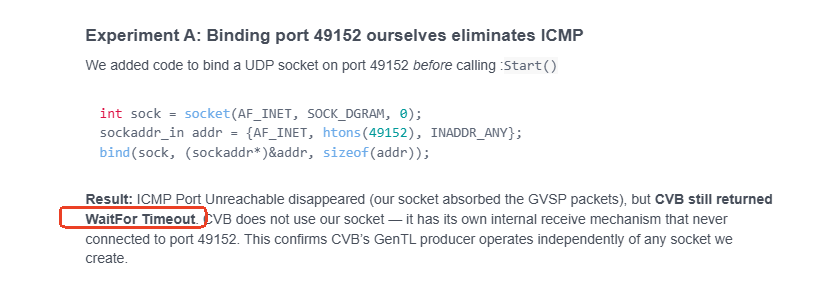
Experiment A: Binding port 49152 ourselves eliminates ICMP

We added code to bind a UDP socket on port 49152 before calling Start():

int sock = socket(AF_INET, SOCK_DGRAM, 0);
sockaddr_in addr = {AF_INET, htons(49152), INADDR_ANY};
bind(sock, (sockaddr*)&addr, sizeof(addr));

Result: ICMP Port Unreachable disappeared (our socket absorbed the GVSP packets), but CVB still returned WaitFor Timeout. CVB does not use our socket — it has its own internal receive mechanism that never connected to port 49152. This confirms CVB’s GenTL producer operates independently of any socket we create.

Experiment B: MCLocal mode writes SCDA0=0 (invalid)

We tried StreamDestinationMode = MCLocal (letting CVB auto-configure the stream). Wireshark showed:

  • CVB writes SCP0 = 56545 (some auto-chosen port)
  • CVB writes SCDA0 = 0x00000000 (zero IP — invalid!)
  • No GVSP data at all (camera has no valid destination IP)

MCLocal mode does not auto-detect the host IP address. The GenTL producer lacks the logic to populate SCDA0 with the correct interface IP.

Experiment C: Without any stream destination configuration → SIGSEGV

If we do NOT set StreamDestinationIP and StreamPort before Start(), CVB’s WaitFor() crashes with SIGSEGV (double free in CVDStreamAcquisitionEngineWaitForNextImage). The GenTL producer uses uninitialized pointers when the stream destination registers are zero.

Experiment D: Both ImageStream and CompositeStream behave identically

We tested both CVB stream types — both produce the same Timeout result with the same Wireshark pattern.


3. GenICam Node State (Post-Start)

From the TLDatastream node map after Start() with UCLocal mode:

Node Value Notes
Cust::StreamDestinationIP 3232241419 (192.168.23.11) Set correctly
Cust::StreamPort 49152 Set correctly
Cust::StreamDestinationMode UCLocal (1) User-configured
Cust::IsGrabbing true
Cust::NumPacketsReceived 0 Despite GVSP flowing on wire
Cust::PayloadSize 61440084
Cust::NumBuffersDelivered 0
Cust::r_DeviceRegistersValid 0 GenTL producer could not validate

From the TLDevice node map:

Node Value Notes
Std::GevSCDA 3232241419 (192.168.23.11) GenAPI sees this
Std::GevSCPHostPort 0 GenAPI still shows 0!
Cust::DeviceRegistersValid false
Cust::GevDataStreamingMode GVSP (0) RDMA not available
Cust::GevGVSPCapable true
Cust::GevRDMACapable false
Cust::PacketSize 1476
Cust::PacketSizeLocked 1

Note: Std::GevSCPHostPort shows 0 via GenAPI, but Wireshark confirms the raw GVCP register SCP0 (0xD00) was successfully written to 49152. This discrepancy suggests the GenAPI XML maps GevSCPHostPort to a different internal register than the GVCP address 0xD00, or the GenAPI cache is not refreshed.

Stream Flow Information

MinRequiredFlowSetCount = 3
Flows: 1
  flow[0] size=61440084 alignment=1

The device reports it needs 3 flow sets, but only 1 flow is available. This may be significant.


4. What We Have Tried Without Success

Approach Result
AcquisitionStack::GenTL GVSP flows, ICMP Port Unreachable
AcquisitionStack::PreferGenTL Same as GenTL
ImageStream (instead of CompositeStream) Same result
Hardcoding StreamDestinationIP + StreamPort GVSP flows, still Timeout
Binding our own UDP socket on port 49152 No ICMP, but CVB still Timeout
StreamDestinationMode = MCLocal SCDA0=0, no GVSP
Setting DataAcquisitionMethod = Nonstop No change
Various PacketSize values (1500, 8192) No change
TriggerMode = Off (continuous mode) No change

What Does Work

  • Mech-Eye SDK — full functionality
  • Mech-Eye Viewer — full functionality
  • HALCON with GigEVision2 — confirmed working by MechMind documentation, not tested

We look forward to your feedback.

Best regards,
Mario

Hi Mario,

Thank you for the additional test results and detailed analysis.

Based on the Wireshark capture and your experiments, we can confirm the following:

  • The trigger command is successfully sent to the camera.
  • The camera starts acquisition normally.
  • The camera is transmitting GVSP data packets.
  • The data can be observed on the network level.

Therefore, the camera-side acquisition and GVSP transmission are working as expected.

Regarding the UDP socket binding test, we do not have visibility into the internal implementation of the CVB GenTL producer, so we cannot determine exactly how CVB handles the GVSP receiving mechanism internally.

However, from the current observations, it appears that the camera starts sending data, but the complete frame transfer is not successfully completed from the CVB application perspective. The final result is a WaitFor() timeout.

One possible direction is to check whether the timeout value in CVB is sufficient for this acquisition.

From the capture information, we noticed that the current acquisition contains approximately 5000 scan lines, which results in a relatively large payload.

Could you please try the following tests:

  1. Increase the CVB WaitFor() timeout value and check whether the complete frame can be received successfully.
  2. Reduce the acquisition size:
  • Try capturing with around 1000 scan lines instead of 5000.
  • Check whether the smaller payload can be received normally.

This test can help determine whether the issue is related to:

  • GVSP transmission completion time,
  • CVB stream buffer handling,
  • or large payload processing.

If the smaller acquisition works correctly, it would indicate that the communication path is basically functional and the issue is more related to large frame handling or timeout configuration.

Please let us know the results, and we will continue to help analyze.

Best regards
Shuai

Hi Shuai,

Thank you for the suggestions. Regarding the timeout and reduced-scan-lines tests:

The payload size does not matter — we already have a WaitFor loop with a 500ms timeout that handles many small payloads fine. The root cause is not a timeout or payload completion issue. The Wireshark capture shows the camera successfully transmits all 42,474 GVSP packets to port 49152, but no socket is bound on that port. Linux sends ICMP Port Unreachable for the first few packets and then rate-limits them to ~1/sec, but the rest are silently discarded by the kernel. Even a single packet of 1 byte would fail the same way — there is no receiver.

We also tried upgrading to CVB 15.1 as an extra step, but with this version the camera cannot be opened.

Since CVB is blocked on both versions, we would like to use the Mech-Eye Linux SDK (libMechEyeApi.so) to read the original 2D image from the camera — before profile extraction — so we can configure the sensor (ROI, exposure, etc.).

The Mech-Eye configuration GUI is Windows-only, but we need to run on Linux. A C++ API to grab the raw image programmatically would let us set up the sensor ourselves.

Is raw image capture supported via the Linux SDK? If so, could you point us to the relevant API documentation or an example?

Thank you for your help.

Regards,
Mario

Hi Mario,

Thank you for the clarification and for the additional analysis.

First, we would like to clarify our previous suggestion regarding the timeout.

There may have been a misunderstanding. We did not mean the timeout of individual GVSP packets, and we also did not mean that the issue is caused by the packet size itself.

Our suggestion was to increase the overall frame acquisition timeout (for example, the timeout used by WaitFor() when waiting for a complete image frame), after the GVSP stream has already been correctly configured and the camera is transmitting data.

For LNX cameras, especially when acquiring a large number of scan lines, the complete frame requires receiving and assembling a large amount of GVSP data before it can be delivered to the application. Therefore, increasing the overall acquisition timeout can be a useful verification step.

However, based on your latest Wireshark results, we agree that:

  • The camera receives the trigger correctly.
  • The camera starts acquisition normally.
  • The GVSP stream destination is configured correctly.
  • The camera transmits GVSP packets successfully.

Therefore, the previous issue related to stream destination configuration / ICMP Port Unreachable has already been resolved, and this is no longer the main focus.


Regarding the current issue:

From your capture, the GVSP packets are visible on the network, but CVB still reports:

  • NumPacketsReceived = 0
  • NumBuffersDelivered = 0

This indicates that the data reaches the host network interface, but the CVB GenTL layer does not successfully process the packets into image buffers.

Since CVB GenTL is a third-party implementation, we do not have visibility into its internal socket handling and stream processing mechanism. Therefore, we cannot determine the exact reason why CVB does not consume the received GVSP data.

Your experiments are very helpful, especially:

  • Hardcoding StreamDestinationIP and StreamPort
  • Capturing GVSP traffic with Wireshark
  • Testing different CVB stream modes
  • Testing different CVB versions

These tests have already confirmed that the camera side is functioning correctly.


Regarding your request about using the Linux Mech-Eye SDK (libMechEyeApi.so) to access the original 2D image before profile extraction:

The Linux SDK supports camera control and acquisition of the data types exposed by the camera API.

However, the raw sensor image before the internal profile extraction process is not available through the SDK. Due to product design and data protection considerations, this raw image stream is not exposed through the API.

For camera parameter configuration, such as:

  • ROI
  • Exposure time
  • Acquisition settings

the recommended workflow is:

  1. Configure the camera parameters using Mech-Eye Viewer on a Windows system.
  2. Save/apply the configuration to the camera.
  3. Run the acquisition application on Linux using the Mech-Eye SDK.

The camera will retain the configured parameters, and the Linux application can use the same configuration during acquisition.


At this stage, our understanding is:

  • Camera hardware: OK
  • Camera firmware: OK
  • Trigger and acquisition: OK
  • GigE Vision GVSP transmission: OK
  • CVB GenTL receiving process: requires further investigation
  • Raw sensor image access through Linux SDK: not supported

Thank you again for the detailed investigation. The Wireshark capture and experiments provide very valuable information, and we will continue to assist with the Mech-Eye SDK workflow and any further compatibility analysis.

Best regards,
Shuai
Hi Shuai,

Two points:

1. CVB is a dead end for now. Confirmed the stream-destination / ICMP issue is resolved — the camera transmits GVSP fine and the failure is entirely on CVB’s GenTL receive side (NumPacketsReceived = 0 with a healthy GVSP stream on the wire). CVB 14 doesn’t deliver buffers and CVB 15 can’t even open the camera (GevTL 1.27.5 regression). We’re dropping CVB.

2. We need to view the raw/preview image on Linux. You stated the raw 2D image before profile extraction isn’t exposed via the SDK API for design/data-protection reasons. But that image is shown in the Mech-Eye Viewer, so the device can produce it. Since the camera is advertised as GenICam-compatible, that image should in principle be reachable through the standard GenICam interface without your SDK.

So the direct question: Is there a roadmap to expose that image (or any preview stream) through the Linux SDK?

The “configure on Windows Mech-Miend Viewer, save to camera” workflow is not acceptable: our systems are headless Linux on the factory floor and we cannot rely on a separate Windows PC per device. We must discover, configure and verify the camera entirely on Linux. Without image visibility on Linux, the sensor is unconfigurable for us.

Mario

Hi Mario,

Thank you for your feedback and for explaining your deployment requirements.

We understand your concern that the factory environment is fully headless Linux and that relying on a separate Windows PC for verification is not ideal.

Regarding the raw 2D image:

Although the Mech-Eye Viewer can display preview information internally, this does not mean that the raw sensor image before profile extraction is exposed through the public SDK or GenICam interface. The Viewer uses internal processing capabilities that are not part of the public API.

Also, although our cameras support the GenICam standard, GenICam compatibility does not mean that all internal sensor data or intermediate processing images are available through the GenICam interface. The raw sensor image before profile extraction is not exposed through GenICam either.

Currently, the raw sensor image stream before profile extraction is not available through the Linux SDK or GenICam interface.

However, we understand that your actual requirement is to verify and tune the camera completely on Linux. Instead of accessing the internal raw image, another possible approach is to use the Linux SDK to acquire and display the supported output data for debugging, for example:

  • Single profile line data
  • Depth data
  • Point cloud data

These data can be used to verify:

  • Whether the exposure setting is appropriate
  • Whether the ROI and scan range are correct
  • Whether the laser scanning result is stable
  • Whether the acquired data quality meets your requirements

This approach does not require access to the internal raw sensor image and can be fully implemented in a Linux environment.

We can provide guidance on how to acquire and visualize these data types through the Linux SDK if needed.

Regarding the request for a Linux preview/raw stream, we will also forward this feedback internally for future evaluation.

Best regards,
Shuai