How can I create a zigzag pattern to the objects I matched on a point cloud.
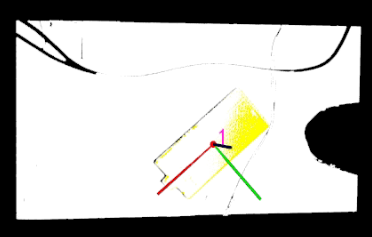
My point is like this and I matched this object.
What I am trying to do is create a zigzag pattern around this object with some offset around it. The “Generate Zigzag Path Around It” step acceps only 1D output.
For generating a zigzag path around a matched 3D object, the built-in zigzag path Step expects a 1D profile input. Here are some suggestions:
Extract the object surface first: After matching, use Steps to extract the surface boundary or contour as a profile that the zigzag Step can accept.
Custom Script Step: Programmatically generate zigzag waypoints based on the matched object pose and bounding box for full control over offset, spacing, and pattern.
Path Planning in Mech-Viz: Depending on your application (dispensing, welding, etc.), Mech-Viz may offer more flexible path planning options.
Could you share more about your application? This will help us recommend the best approach.